
Your Google Business Profile is often the first thing a nearby customer sees before they call, visit, ask for directions, or click your website. Use this Google Business Profile optimization checklist to confirm the basics, improve trust, and connect your profile to real customer actions.
- Use this checklist when you need a practical GBP cleanup before broader local SEO work.
- Pause if your business name, address, phone, hours, or services are still changing.
- Start if you’ve claimed your profile but haven’t recently checked categories, services, reviews, photos, and tracking.
- Get expert help if you manage several locations, see ranking drops, or need GBP connected to a full SEO strategy.
Why GBP Matters
GBP means Google Business Profile, the free local business listing that can appear in Google Search and Google Maps. GBP matters because it helps Google and customers understand who you are, where you serve people, and which local searches your business may fit.
Google Business Profile SEO usually means keeping the profile complete, accurate, and connected to your website, reviews, citations, and services. Citations are online mentions of your business name, address, and phone number on directories or local sites.
Before you edit anything, confirm:
- Verify the profile is claimed and accessible.
- Confirm the business name matches your real-world name.
- Test the phone number.
- Check the website link.
- Review hours, holiday hours, and appointment options.
- Compare profile details with major citations.
A clean profile doesn’t guarantee local pack rankings, but it gives customers fewer reasons to leave. If you’re comparing broader visibility options, this guide to local SEO vs traditional SEO explains how local search differs from standard website SEO.
Get the Basics Right
Getting the basics right means making every core detail accurate, consistent, and easy for customers to use. Start here before you edit categories, services, or posts.
Open your Google Business Profile and work through the fields one by one. NAP means name, address, and phone number. Small formatting differences may be harmless, but mismatched phone numbers, addresses, or names can confuse customers and weaken trust. Before changing your name or eligibility details, review Google’s official Business Profile guidelines so your profile reflects your real-world business.
| Task | When | Owner | Tool/source | Pass/fail check |
|---|---|---|---|---|
| Verify the profile | Before optimization | Owner or manager | GBP dashboard | Profile access is confirmed |
| Check NAP details | Monthly | Owner or admin | GBP and citations | Name, address, phone match |
| Update hours | Before holidays | Front desk or manager | GBP hours section | Regular and special hours are correct |
| Add website URL | During setup | Website owner | GBP website field | Link opens the right page |
| Review attributes | Quarterly | Manager | GBP attributes | Features match real customer experience |
Now follow the basic setup steps:
- Check your business name.
- Add your address or service area.
- Confirm your phone number.
- Add your website URL.
- Add hours and special hours.
- Add attributes, such as accessibility or appointment options, only when true.
- Save changes and check the public view.
For a storefront, verify directions, parking context, hours, and exterior photos. For a service-area business, list only the areas where you actually accept jobs. On launch day or after any move, call the listed number, open the map pin, and click the website link from a phone.
Choose Categories Carefully
Your primary category should describe your main business as clearly as possible. The primary category is the main label Google uses to understand what your business does.
Open the category field and choose the closest fit to your real work. If you’re a plumber, don’t choose a broad home services category just because it sounds bigger. If you’re a dental clinic, don’t pick every dental-related category unless those services are truly part of your business. Category stuffing means adding too many categories just to chase rankings. Avoid it because it can make your profile look unfocused.
Use this category checklist:
- Choose one primary category that matches your main revenue service.
- Verify that secondary categories describe real services.
- Compare competitors, but don’t copy them blindly.
- Remove categories for services you no longer provide.
- Recheck categories when your business model changes.
Example: a garage door repair company should choose categories tied to garage door services and list service areas where it actually sends technicians. It should not add locksmith, roofing, or general contractor categories unless it truly provides those services.
Categories should match your website and your real jobs. If your profile says one thing and your website says another, your local relevance gets weaker.
Add Services and Descriptions
Adding services and descriptions helps customers understand exactly what you offer before they click or call. Services are the individual offerings listed inside your Google Business Profile.
Open the services section and add your main services in plain language. Write for the person deciding whether you can solve their problem. For example, “emergency drain cleaning” is clearer than a long string of repeated keywords. Your business description should explain who you help, where you work, and what you do best without sounding stuffed.
Use this process:
- List your main services.
- Match each service to a page on your website when possible.
- Add products only if they fit your business model.
- Remove outdated services.
- Check that service names match what customers actually ask for.
A strong GBP optimization habit is to connect every major GBP service with a matching website service page. If your profile lists “water heater repair,” your website should have a clear page about water heater repair in your service area. If traffic reaches your site but doesn’t become calls or forms, this guide on turning traffic into leads can help you spot page-level problems.
Keep the description natural. Mention your city or service area when it fits, but don’t repeat the same location several times.
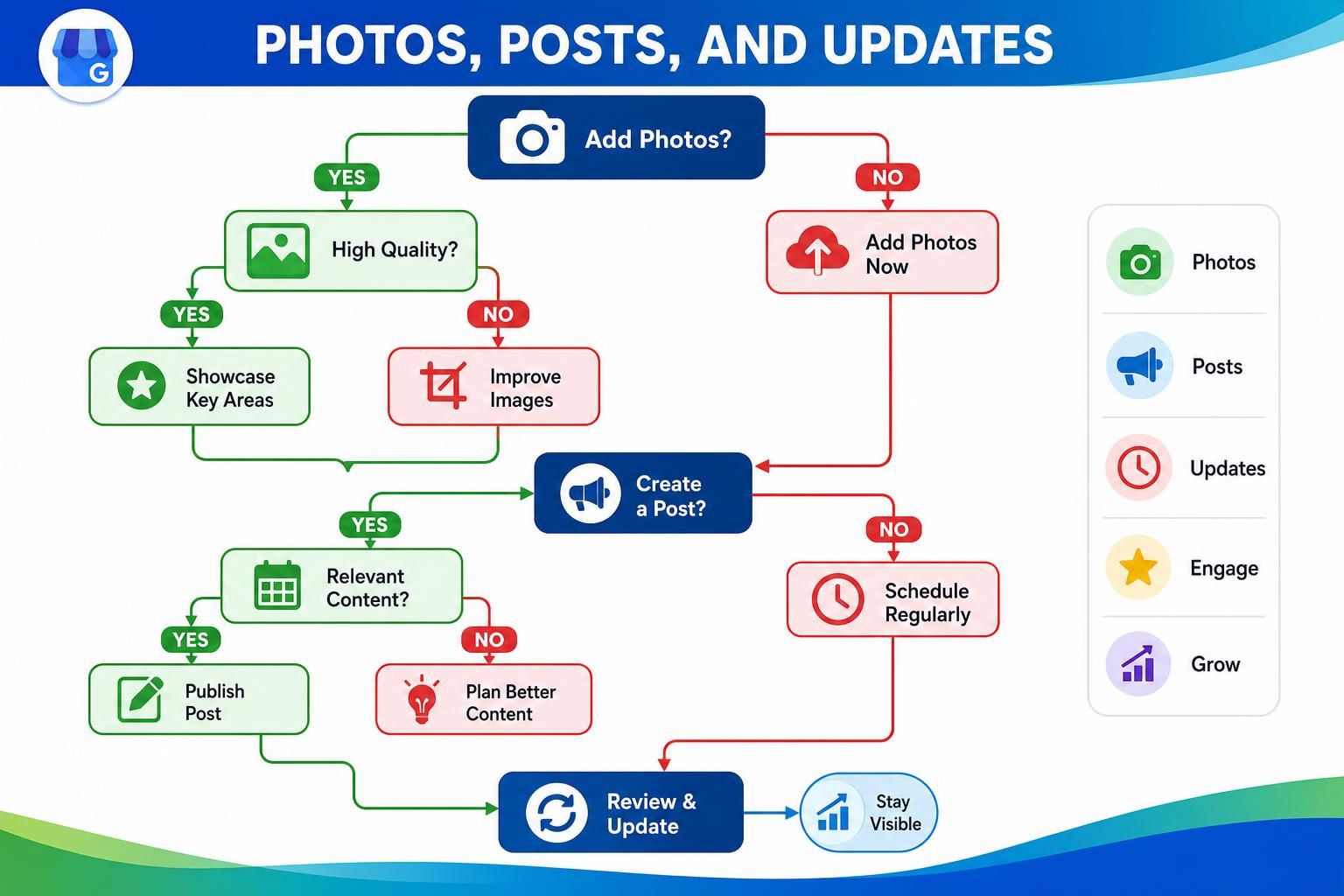
Photos, Posts, and Updates
Photos, posts, and updates make your profile feel active and trustworthy. They help customers understand what to expect before they contact you.
Add photos that answer practical questions:
- Add a clear logo.
- Add an exterior photo if customers visit you.
- Add interior photos for storefronts, clinics, salons, and offices.
- Add service photos that represent real work.
- Show vehicles, uniforms, entrances, menus, or project examples when relevant.
- Publish updates for seasonal services, events, or important changes.
- Remove outdated or misleading images.
For a restaurant, useful photos might include the entrance, seating, menu items, and busy-hour atmosphere. For a contractor, they might include real project photos, vehicles, uniforms, and before-and-after examples when appropriate.
Posts are short updates inside your profile. Use them for practical messages: seasonal availability, schedule changes, new services, or helpful reminders. Before launch, add core photos. On launch day, confirm the public profile displays the right logo, cover image, hours, and contact options. After launch, review photos monthly and remove anything that no longer reflects the business.
Reviews and Responses
Reviews and responses build trust because they show real customer experience and how your business communicates. They’re one of the clearest signals customers use when comparing nearby businesses.
Ask for reviews after a completed job, visit, or purchase. Keep the request simple. Don’t script what customers should say, don’t ask for fake reviews, and don’t offer rewards for positive reviews. For compliance, review Google’s Maps user-generated content policy and review rules before building a review request process.
Use this review workflow:
- Ask at the right moment, after the customer has had a good experience.
- Send the review link through your normal customer communication channel.
- Thank customers for positive reviews.
- Respond calmly to negative reviews.
- Avoid copy-paste replies that sound automated.
Here’s a natural response example: “Thanks, Maria. We’re glad we could help with your furnace repair in Northwood and get everything running again. We appreciate you choosing our team.”
That response works because it thanks the customer, references the service, and sounds human. It doesn’t stuff keywords or pressure anyone. If you’re trying to understand where review management fits in a broader plan, this overview of small business SEO services shows how local SEO work is often organized.
Tracking Calls and Website Clicks

Tracking calls and website clicks tells you whether your GBP changes are helping people take action. Without tracking, GBP optimization becomes guesswork.
Open your profile performance data and review calls, website clicks, direction requests, messages, and search terms when available. Performance data won’t explain everything, but it gives you a useful starting point. Look for patterns before and after updates.
Use this tracking checklist:
- Record calls before major profile changes.
- Record website clicks before changes.
- Monitor direction requests if customers visit your location.
- Use a tagged website URL when possible.
- Compare profile activity with website leads.
- Document changes so you know what may have affected results.
A tagged URL often uses UTM parameters. UTM parameters are small tracking labels added to a link so analytics tools can show where visitors came from.
Simple decision path: if GBP clicks rise but leads don’t, review the landing page. If calls rise after service edits, your profile may be answering customer questions better. If direction requests drop after an hours change, verify that your hours and map pin are still correct.
For many businesses, GBP tracking should feed directly into an SEO strategy. That way, you’re improving the path from local search to call, visit, quote request, or booking.
FAQ
These Google Business Profile optimization questions come up often because most local business owners want to know what to fix, how often to check it, and what mistakes to avoid.
Use the answers below as a quick troubleshooting guide. If you’re stuck, return to the checklist sections above and fix the basics first.
How Often Should I Update My Google Business Profile?
Check your profile at least monthly for accuracy. Update it sooner when hours, services, staff, photos, appointment links, or service areas change. You don’t need to post every day, but customers should be able to trust what they see.
Should I Add Keywords to My Business Name?
Use your real business name. Don’t add extra keywords just to rank for more searches. A keyword-stuffed name can look spammy to customers and may create consistency problems across citations, invoices, signage, and your website. Check Google’s Business Profile guidelines before changing a name field.
How Do GBP Services Connect to Website Service Pages?
Each major GBP service should point customers toward a matching website page when possible. For example, if your profile lists “roof repair,” your website should clearly explain roof repair, service areas, and how to request help. This creates a stronger path from Google Maps SEO to conversion.
Can Reviews Improve Local Trust?
Yes, reviews can improve customer trust because they show what real people experienced. Ask for honest reviews and respond like a human. Natural mentions of services and locations are fine when they fit the conversation. Don’t script fake-sounding review language.
What Should I Track After Optimizing My Profile?
Track calls, website clicks, direction requests, messages, and form leads from GBP visitors. Compare these signals before and after major updates. If you’re weighing budget for help, this guide to local SEO pricing can help you understand what local SEO work may include.
Conclusion
A useful Google Business Profile optimization checklist keeps you focused on accurate details, careful categories, clear services, current photos, honest reviews, and practical tracking. Your profile should match your website, citations, and the real services customers can buy from you.
Start with the basics, review performance monthly, and use what you learn to support a wider SEO strategy for your local business.