
The best post-purchase email flow doesn’t start with “buy again.” It starts by helping your customer feel confident they made the right choice. Right after checkout, they’re engaged, but they may also wonder: Did my order go through? How do I use this? What happens if it doesn’t fit?
Use this four-email map, then adjust timing by delivery status, product type, and purchase cycle.
| Flow | Trigger | First delay | Email count | Main CTA | Suppression rule |
|---|---|---|---|---|---|
| Confirmation | Order placed | Immediately | 1 | Check order details | Refund or failed payment |
| Product education | Delivered or access active | 0–3 days | 1 | Start using it | Delivery/access issue |
| Review or feedback | Delivered plus usage buffer | 5–21+ days | 1 | Review or get help | Review left or support open |
| Cross-sell/reorder | Natural usage cycle | 20–45+ days | 1 | Refill or add a match | Recent purchase or complaint |
Why the Sale is Not the End
Right after checkout, your customer is excited, but they may also be wondering, “Did I choose the right thing?” A good the 5 email flows every ecommerce answers that question before doubt turns into a support ticket, return, or silent disappointment.
Think of the sale as the start of onboarding. Onboarding means helping someone understand, receive, use, and enjoy what they bought. That could mean care tips for apparel, login instructions for a digital product, refill reminders for consumables, or setup support for a high-ticket item.
The goal isn’t to rush into another sale. It’s to build trust, reduce buyer’s remorse, improve the product experience, and create reasons for the customer to come back later. Retention means keeping customers over time, and it usually starts with how supported they feel after the first purchase.
So before you ask for a review or recommend another product, make sure the customer has actually received, understood, and used what they bought.
Email 1: Confirmation and Reassurance
Send this email immediately after checkout, or within a few minutes. Its job is to calm the “Did my order go through?” feeling and make the next step obvious.
- Confirm the basics: order number, product name, price, shipping address, and expected delivery or access details.
- Reassure the customer: tell them what happens next and when they’ll hear from you again.
- Give support options: link to your help center, returns page, or a simple “reply to this email” contact.
- Match the product type: for consumables, mention when it ships; for apparel, include fit or exchange reassurance; for digital products, add login or download instructions; for high-ticket products, explain setup, delivery, or onboarding support.
Keep the tone warm and plain. “Your order is confirmed. We’ll send tracking as soon as it ships” is better than a clever message that leaves them guessing.
Email 2: Product Education
Your second email teaches the customer how to get value from what they bought. Send it after they’ve had access to the product: typically 1–3 days after delivery for physical goods, immediately or within 24 hours for digital products, and after the first onboarding touch for high-ticket items.
- Show the first step. For skincare, explain when and how much to use. For coffee, suggest a brew ratio. For a course, link to lesson one.
- Reduce confusion. Add sizing notes, care instructions, setup videos, login help, or “what to do if this doesn’t fit” guidance.
- Match the product type. Apparel emails can cover fit, styling, washing, exchanges, or returns. Consumables can explain storage and usage. Digital products should focus on access and activation. High-ticket products need setup guidance and support options.
Don’t sell yet if the customer hasn’t used the product. Help them succeed first. That’s what earns the next purchase.
Email 3: Review or Feedback Request
Ask for a review only after the customer has had a fair chance to receive and use the product. The emotional job of this email is to show you care about their experience, not just your star rating.
- Check delivery first. If you can, trigger this email after confirmed delivery. If not, add a buffer based on your typical shipping time.
- Match the timing to the product. Apparel might need 5–10 days after delivery so they can try the fit, wash it, or style it. Consumables may need 7–21 days, depending on how fast the product is used. Digital products can ask after activation, lesson completion, or a few days of access. High-ticket products usually need longer, often after setup or support has happened.
- Give two paths. Say, “Loving it? Leave a review.” Then add, “Something not right? Reply and we’ll help.”
That second path protects retention. A quiet unhappy customer won’t come back.
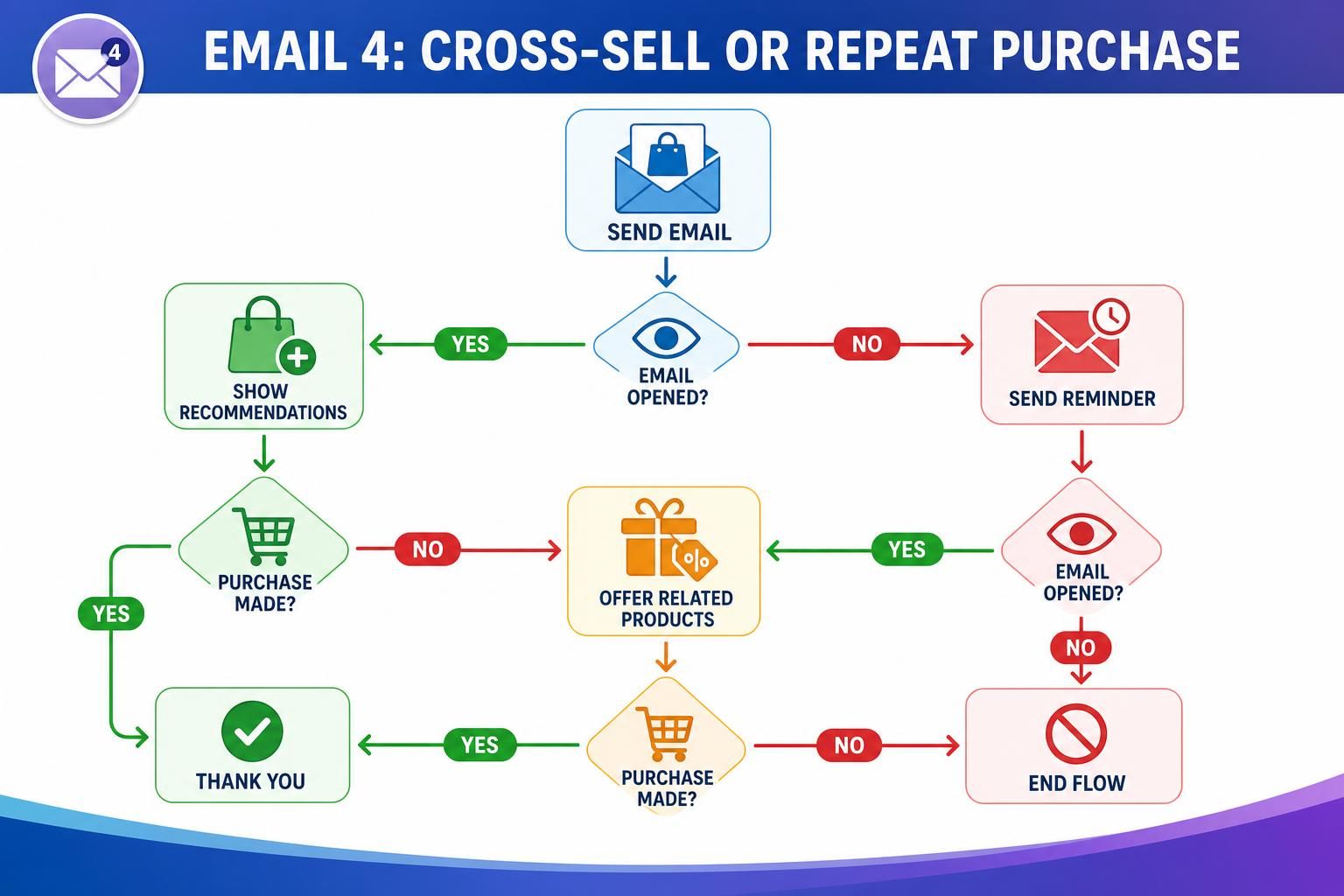
Email 4: Cross-sell or Repeat Purchase
Send the fourth email when buying again would actually make sense. This email can suggest a cross-sell, which means a related product, or a repeat purchase of the same item.
Don’t send it before the customer has received, used, and understood what they bought. That feels pushy. Instead, base it on the product’s natural usage cycle.
- Match the offer to the original purchase. If they bought shampoo, suggest conditioner or a refill. If they bought running shoes, suggest socks, care tips, or weather-appropriate gear.
- Time it around need. Consumables might get a “running low?” email after 20–45 days, depending on size and usage. Apparel may work better after fit and care reassurance, with styling ideas or matching pieces. Digital products can offer the next course after activation or lesson completion. High-ticket products need more patience, often after setup, support, or a success check-in.
- Keep the tone helpful. “Ready for the next step?” beats “Buy more now.”
Timing and Segmentation
Set timing from the customer’s real experience, not from a fixed calendar. A “review us” email before delivery feels careless. A refill reminder too early feels pushy.
Use simple segmentation, which means splitting customers into groups so they get more relevant emails.
- Start with delivery status. Pause education, review, and cross-sell emails until the order is delivered, especially for physical products.
- Separate first-time and repeat customers. First-time buyers need reassurance and help. Repeat customers may appreciate shortcuts, loyalty perks, or replenishment reminders.
- Segment by product type. Consumables can wait until the item may be running low. Apparel needs fit, care, styling, and return reassurance. Digital products need access instructions and activation nudges. High-ticket products need setup help and support before any next offer.
- Watch engagement. If someone hasn’t opened anything, slow down. If they click setup guides, send more help before selling.
Good segmentation makes the flow feel personal, not automated. Use opt-in consent, honor unsubscribes, avoid promotional content in transactional-only emails, and monitor spam complaints.
Metrics to Track

Track email marketing metrics as signals from the customer, not just as a sales scoreboard. If people ignore, unsubscribe, or contact support after your emails, the flow may be too early, too pushy, or not helpful enough.
| Metric | What it tells you | What to adjust |
|---|---|---|
| Open rate | Subject line and timing interest | Test clearer timing, like “Your setup guide is here” |
| Click rate | Whether the email helps | Move key links higher or simplify the message |
| Repeat purchase/review rate | Whether the ask came at the right time | Delay for slow-use products or high-ticket orders |
| Unsubscribes/support tickets | Friction or confusion | Reduce selling and add clearer help |
Treat open rate as directional because privacy changes can inflate or obscure opens. Prioritize clicks, revenue, conversions, unsubscribe rate, placed-order rate, and review or support actions.
Check results by product type. A consumable may show repeat purchase activity weeks later. Apparel may show more exchange or fit questions. Digital products may reveal access problems through low clicks or support requests. High-ticket products may need longer timelines before repeat revenue appears. The goal is a smoother customer experience that earns the next purchase naturally.
FAQ
How Many Post-purchase Emails Should I Send?
Start with 4 emails: reassurance, product education, feedback or review, then repeat purchase or cross-sell. That’s enough to support the customer without crowding their inbox. Adjust by product type. Consumables may need reorder reminders, while high-ticket products often need more setup and support emails before any sales message.
Should I Offer a Discount After Every Purchase?
No. Use discounts carefully, not automatically. First, help the customer feel confident and successful. For apparel, that may mean fit and return reassurance. For digital products, it may mean login help. Save discounts for moments when they make sense, such as replenishment, loyalty, or a relevant second product.
When Should I Ask for a Review?
Ask after the customer has had a fair chance to receive and use the product. That could be a few days after delivery for apparel, several weeks for a consumable, or after activation for a digital product. For high-ticket purchases, wait longer and check satisfaction first.
When Should Someone Stop Receiving the Flow?
Stop or change the flow when the customer takes the main action, such as leaving a review, buying again, or requesting support. Also pause sales-focused emails if there’s a delivery issue, refund request, or unresolved complaint. A good flow reacts to the customer’s experience.
Conclusion
A strong post-purchase email flow helps customers feel reassured, understand what they bought, get support at the right time, and return when it actually makes sense. The best timing depends on delivery, usage cycle, product type, and customer behavior.
Don’t rush the next sale before the customer has received value. Map your first four emails, choose timing for each product category, and start improving the flow based on reviews, clicks, repeat purchases, unsubscribes, and support signals.