
SEO and PPC can both look productive in traffic reports, but traffic doesn’t tell you which channel creates real enquiries, booked calls, customers, or revenue. To track leads from SEO and PPC properly, connect each meaningful action to its source, landing page, campaign, and CRM record.
Use a simple flow:
- Track forms, calls, bookings, purchases, and high-intent enquiries as conversions.
- Send clean GA4 events and configure Google Ads conversion tracking for paid campaigns.
- Store source attribution in your CRM so you can compare lead quality, not just lead volume.
GA4, Google Ads, call tracking, and your CRM each answer a different question. GA4 shows onsite behavior, Google Ads helps optimize paid spend, call tracking captures phone leads, and the CRM shows which leads became sales-qualified or closed.
Why Lead Tracking Matters
Lead tracking turns SEO and PPC from traffic channels into decision-making data. Without it, you’re left guessing whether organic service-page visits, paid search clicks, phone calls, and form submissions are actually turning traffic into leads and creating pipeline.
The key is separating activity from value. A PPC campaign might generate fewer enquiries than SEO but produce more sales-qualified leads. Or SEO might look slower in GA4, yet drive high-intent contact forms that close at a better rate once they’re logged in your CRM. You won’t see that from sessions or rankings alone.
- Move budget toward campaigns, keywords, and landing pages that create qualified leads.
- Spot wasted spend, such as PPC clicks that submit low-quality forms or never answer sales follow-up.
- Prove marketing value with CRM/source attribution, not just GA4 conversion counts.
- Compare SEO and PPC fairly by looking at lead source, lead type, and eventual outcome.
So what does this mean in practice? You’re not just tracking “conversions.” You’re building a trail from first visit to enquiry to sales outcome.
What Counts as a Lead
A lead is any action that gives your sales or marketing team a real follow-up opportunity, not every interaction that looks nice in a dashboard. A contact form from an organic service page, a call from a PPC landing page, a demo request, a booking, or a purchase can all count — but they shouldn’t all be valued the same.
Use lead categories before you configure GA4 events or Google Ads conversion actions. Otherwise, you’ll end up optimizing campaigns toward easy actions, like newsletter signups, instead of enquiries that can become revenue.
| Action | Lead type | Track as | Sales value |
|---|---|---|---|
| Contact form | High-intent enquiry | GA4 event + CRM source | Review quickly |
| Phone call | High-intent enquiry | Call tracking + Google Ads/CRM | Qualify by outcome |
| Booking/demo request | Sales-ready lead | GA4 event + CRM record | Prioritize |
| Newsletter/download | Soft conversion | GA4 event only | Don’t mix with leads |
The practical rule: count purchases and high-intent enquiries separately from soft conversions. That keeps SEO and PPC reporting honest when you compare lead volume, lead quality, and actual sales follow-up.
Track Forms, Calls, Bookings, and Purchases
Track each lead type at the point where intent becomes clear, then pass the source into your reporting and CRM. Don’t rely on “thank-you page views” alone if users can refresh, return later, or submit twice.
- Track form submissions as GA4 events. Use a clear event name such as generatelead or contactform_submit, then send the same submission into your CRM with source/medium, landing page, and campaign fields. For example, an organic visitor lands on a service page, submits the form, and becomes an “Organic Search” lead in the CRM.
- Track phone calls with call tracking. Use dynamic numbers where possible so SEO calls and PPC calls aren’t blended together. For Google Ads, import qualified calls as conversions when they meet your sales criteria, not just because someone dialed.
- Track booking and demo requests as high-intent events. Record the GA4 event, then match it to CRM source data so you can compare SEO and PPC lead quality later.
- Track purchases separately from enquiries. Revenue should sit in its own conversion category so soft actions don’t inflate your lead numbers.
Use GA4 and Google Ads Conversion Tracking
GA4 and Google Ads answer different questions, so set them up to work together without treating them as the same source of truth.
- Create GA4 events for the lead actions you care about: formsubmit, phonecallclick, demorequest, booking_complete, and purchase. Mark only the meaningful ones as key events so newsletter signups or PDF downloads don’t sit beside sales enquiries.
- Add Google Ads conversion tracking for paid actions you want the algorithm to optimize toward. For PPC forms, calls, and landing page bookings, use Google Ads conversions or import selected GA4 key events, but keep the naming consistent so reports don’t become a guessing game.
- Track calls separately. A Google Ads visitor who calls from a PPC landing page should be attributed through call tracking, then imported into Google Ads if the call meets your conversion rules.
- Compare both systems against CRM records. GA4 can show the event and source/medium; Google Ads can show campaign performance; your CRM tells you whether that lead became qualified, quoted, or closed. That’s where SEO and PPC lead quality becomes visible.
Separate SEO and PPC Reporting
Separate SEO and PPC before judging performance, or you may optimize the wrong channel.
- Use source/medium as your first split. In GA4, organic search leads usually appear as google / organic, while paid clicks should appear as google / cpc or paid search, depending on setup.
- Keep PPC landing pages clean. If you use dedicated Google Ads landing pages, report their form fills, calls, and bookings separately from SEO service pages. This shows whether paid traffic is converting because of the offer, keyword, or page experience.
- Add UTMs where auto-tagging doesn’t cover you. Use consistent campaign names for non-Google paid campaigns so they are not lumped into referral or direct traffic.
- Pass attribution into the CRM. Store original source, latest source, landing page, campaign, and lead type, so organic bookings and Google Ads calls do not both appear as generic website leads.
Then compare organic and paid search by quality, not just volume. SEO may produce fewer forms but stronger sales-qualified leads; PPC may create faster enquiries but need tighter keyword filtering.
Common Tracking Mistakes
The easiest way to ruin SEO and PPC reporting is to count activity instead of qualified intent. Pageviews, scrolls, and newsletter signups can be useful signals, but they shouldn’t sit in the same “lead” bucket as purchases, demo requests, quote forms, or booked consultations.
Watch for these common mistakes:
- Missing phone calls. A PPC visitor may click a landing page, call the business, and never submit a form. Without call tracking, that lead often gets credited to “direct” or disappears.
- Importing every GA4 event into Google Ads. Send only meaningful PPC conversion actions, or Google Ads may optimize toward soft actions instead of sales opportunities.
- Mixing SEO and PPC sources in the CRM. Store original source, latest source, campaign, landing page, and lead type so sales can compare quality later.
- Ignoring offline outcomes. A form submission isn’t the same as a sales-qualified lead. Match CRM status back to channel whenever you can.
Clean tracking doesn’t mean more conversions; it means fewer misleading ones.
Simple Tracking Setup

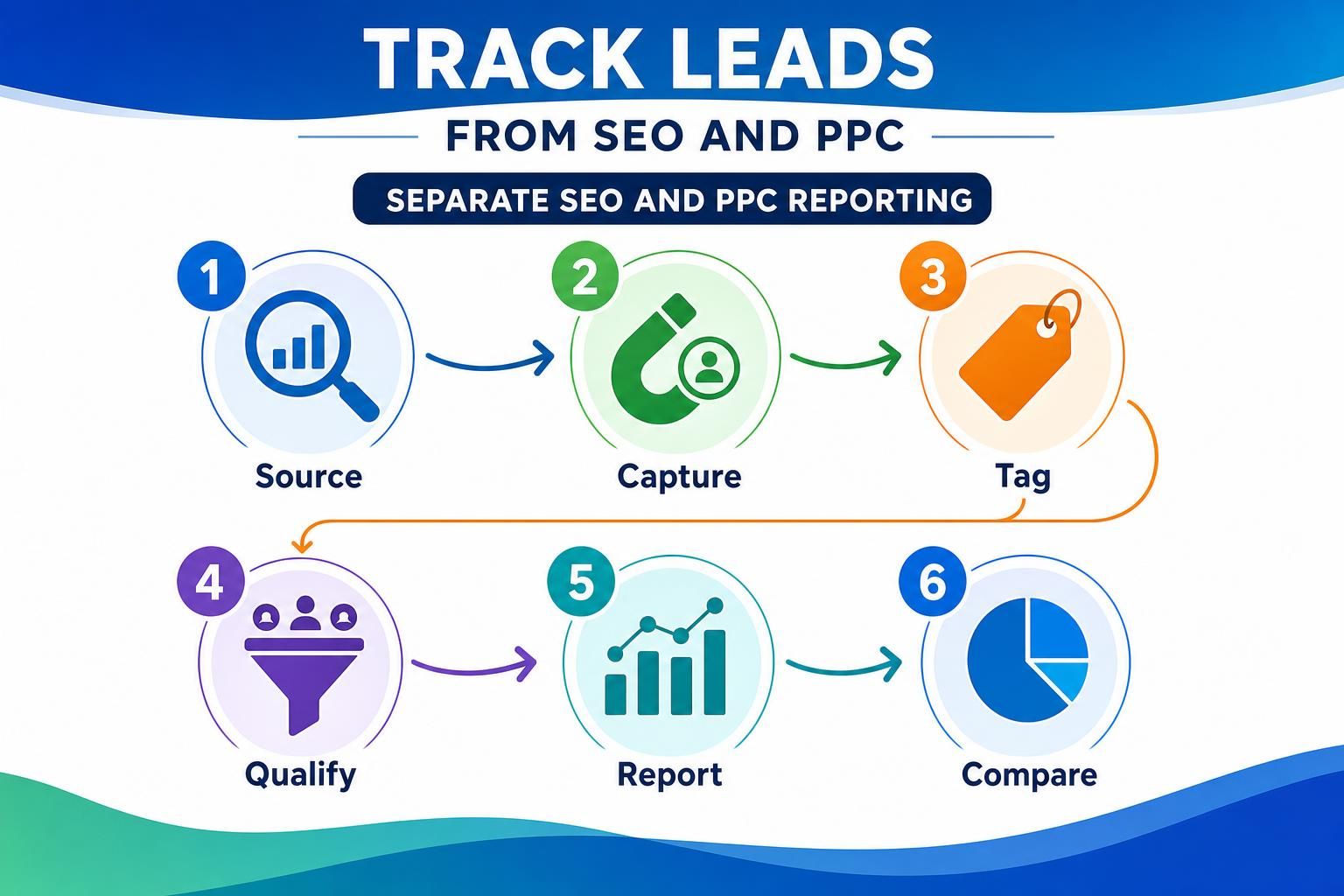
Build the setup in the same order a lead moves through your funnel: click, conversion, source capture, sales outcome.
- List your real lead actions: contact forms, demo requests, calls, booking submissions, purchases, and high-intent enquiries. Keep newsletter signups separate as soft conversions.
- Create matching GA4 events for each action, using clear names like generatelead, bookconsultation, and phone_call.
- Set Google Ads conversion actions only for PPC outcomes you want the algorithm to optimize toward. For calls, use call tracking so a PPC landing page call can be attributed and, where appropriate, imported into Google Ads.
- Add source fields to your forms and CRM: original source, latest source, medium, campaign, landing page, lead type, and date.
- Use UTMs on paid campaigns. Let organic search rely on source/medium and landing page data.
- Reconcile CRM outcomes weekly: submitted lead, qualified lead, opportunity, customer, lost.
You’re not trying to make every platform match perfectly. You’re building a clean chain of evidence so SEO and PPC can be compared on lead quality, not just conversion volume.
FAQ
Can GA4 Show Whether a Lead Came From SEO or PPC?
GA4 can show the session source/medium, landing page, and event that triggered the lead, so it's useful for channel reporting. But it won't prove lead quality by itself. Send the same lead into your CRM with source fields, then compare qualified leads, opportunities, and customers.
Should Google Ads and GA4 Conversions Match Exactly?
No. They use different attribution rules, click windows, and reporting logic, so small gaps are normal. Configure the conversion names and trigger points consistently, then decide which system answers which question: Google Ads for campaign optimization, GA4 for site behavior, CRM for sales outcomes.
How Do I Track Phone Call Leads From SEO and PPC?
Use call tracking with dynamic numbers where possible, especially on PPC landing pages and high-value SEO pages. Attribute the call to source, medium, campaign, and landing page, then push qualified calls into Google Ads or your CRM so calls aren't invisible next to form submissions.
What Should I Do With Newsletter Signups?
Track them, but don't mix them with high-intent leads like demo requests, bookings, purchases, or quote forms. Label them as soft conversions in GA4 and your CRM. That keeps SEO and PPC reports honest when you're comparing channels by pipeline value rather than audience growth.
Conclusion
A useful lead tracking setup doesn't ask, “Which channel got the most conversions?” It asks, “Which channel produced the leads sales can actually work?” Use GA4 events for on-site actions, Google Ads conversion tracking for paid optimization, call tracking for phone enquiries, and CRM/source attribution for quality and revenue.
If you want to track leads from SEO and PPC properly, separate the channels early, count only meaningful actions, and reconcile marketing data with sales outcomes. Your next step: audit one full lead path today, from landing page to CRM status, and fix the first broken handoff.